
How to Use Hedy for Recruiting
Run better interviews with a copilot that knows the role and the candidate. This guide walks you through how to set up and get the most out of Hedy’s Recruitment session type. It is built for the people doing the hiring: recruiters, hiring managers, and anyone pulled into an interview loop. If you are the one being interviewed, see How to Use Hedy for Job Interviews instead.
It works for every format: video interviews on Teams, Zoom, or Meet with Hedy running on your desktop, phone screens, and in-person interviews with your phone or laptop in the room. Whatever the format, tell the candidate you are using an AI assistant for notes, and follow whatever disclosure rules your company has. It also frees you to actually listen instead of typing.
Step 1: Select the Recruitment Session Type
Before the interview, make sure Hedy is in the right mode:
-
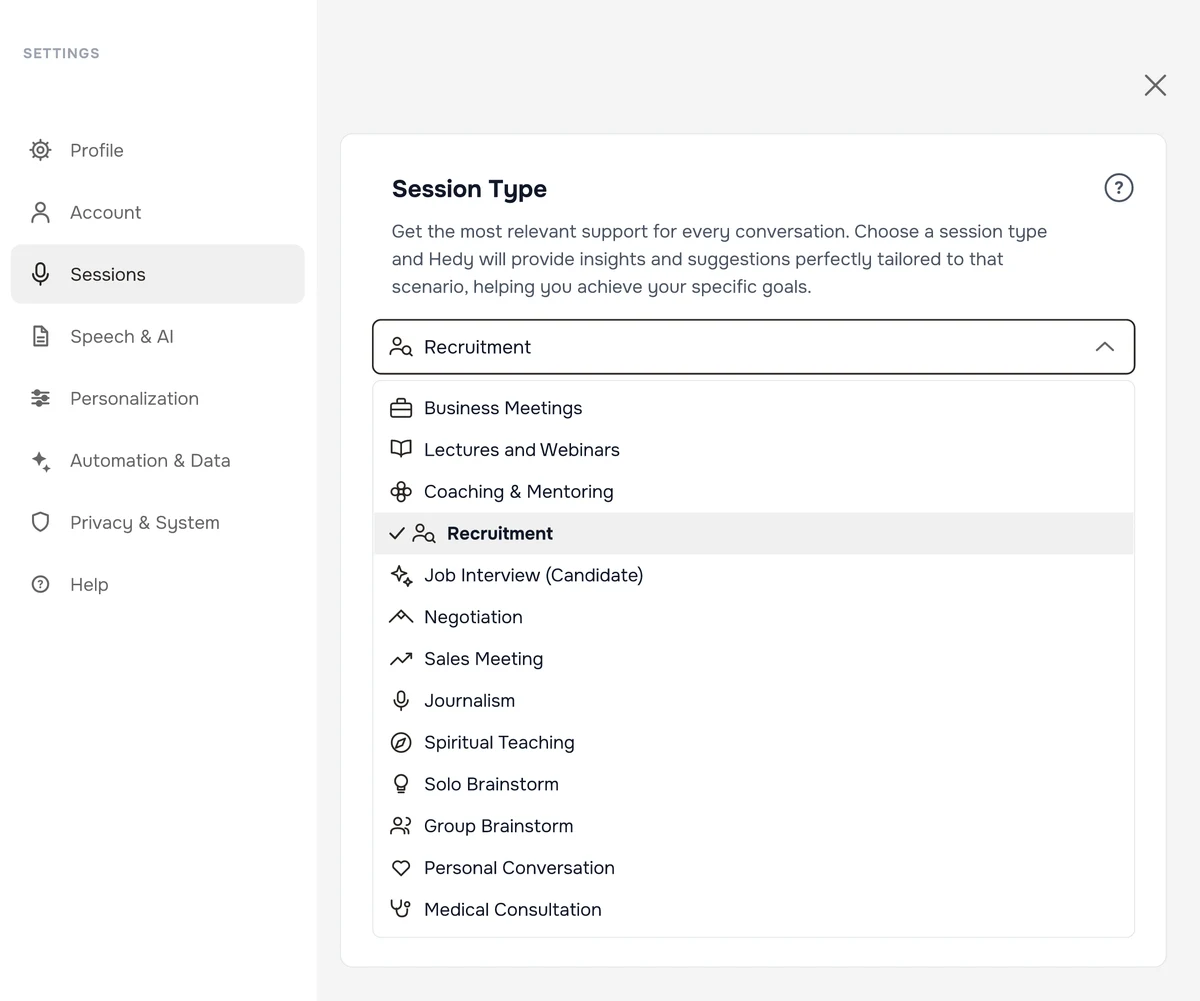
Open Settings and go to the Sessions tab
-
Select Recruitment as your session type
This switches Hedy into interviewer mode. Suggestions, the recap, and the detailed notes are built around assessing the candidate, digging into their experience, and handling the practical side of hiring.
Step 2: Put the Job Description in the Session Context
This is the reusable half of your setup. Create a custom context for the role: open Settings, go to Personalization, and tap Add Context. Give it everything that stays true across every candidate for the role, then select it from the Session Context dropdown when you start an interview. When you hire for several roles at once, save one context per role and pick the right one before each conversation.
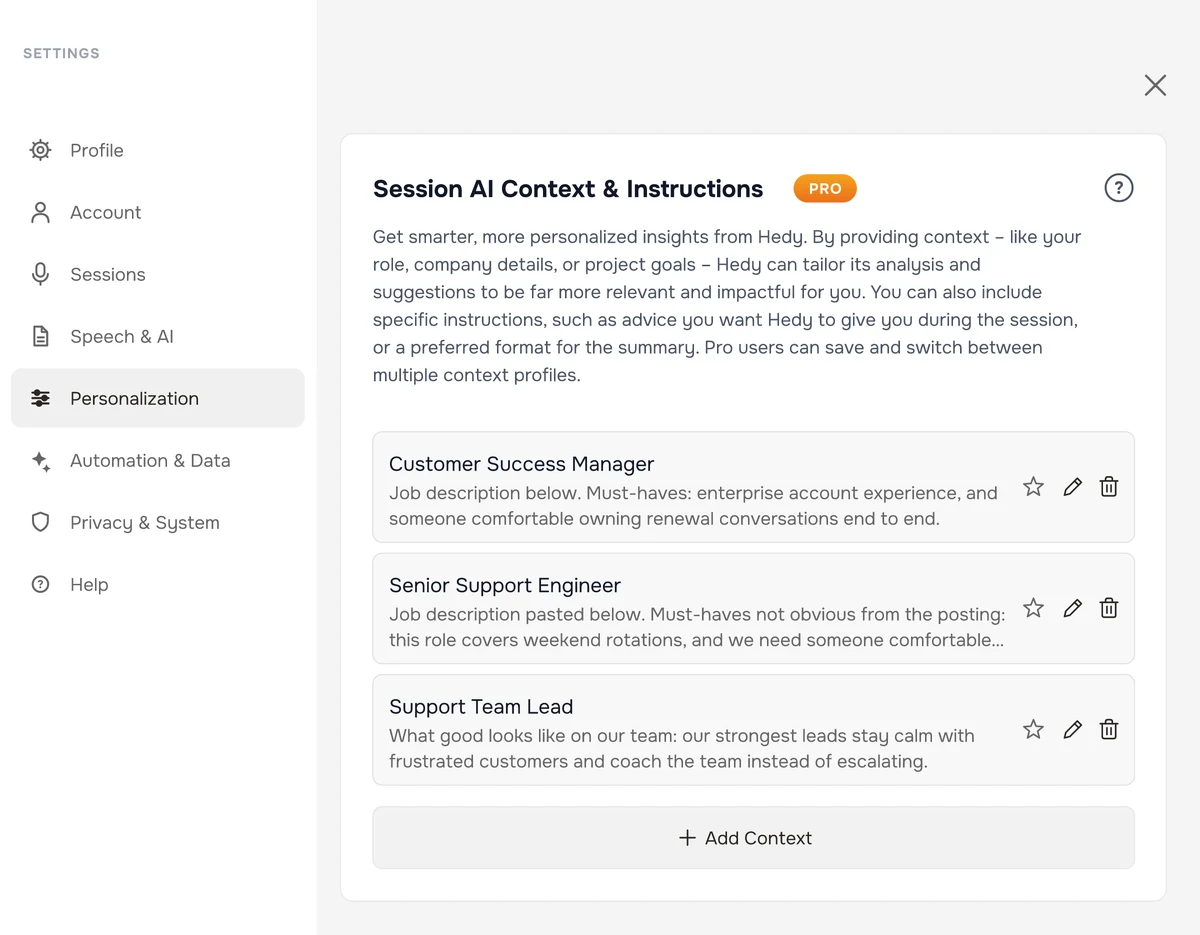
Here is what belongs in it:
The job description
Paste it in. Hedy tailors its suggestions to the role’s actual requirements instead of generic interview questions.
Your must-haves beyond the posting
The things the posting undersells: a non-negotiable certification, the team’s actual tech stack, the working hours the role really demands. Hedy can point out when one has not come up yet.
What good looks like on your team
The traits your best people in this role share, and what tripped up hires who did not work out. This stays true for every candidate, and it sharpens what Hedy listens for.
Example session context: “Job description pasted below. Must-haves not obvious from the posting: this role covers weekend rotations, and we need someone comfortable presenting to executives. Our strongest people in this role stay calm with frustrated customers; the two hires who did not work out struggled with the shift schedule.”
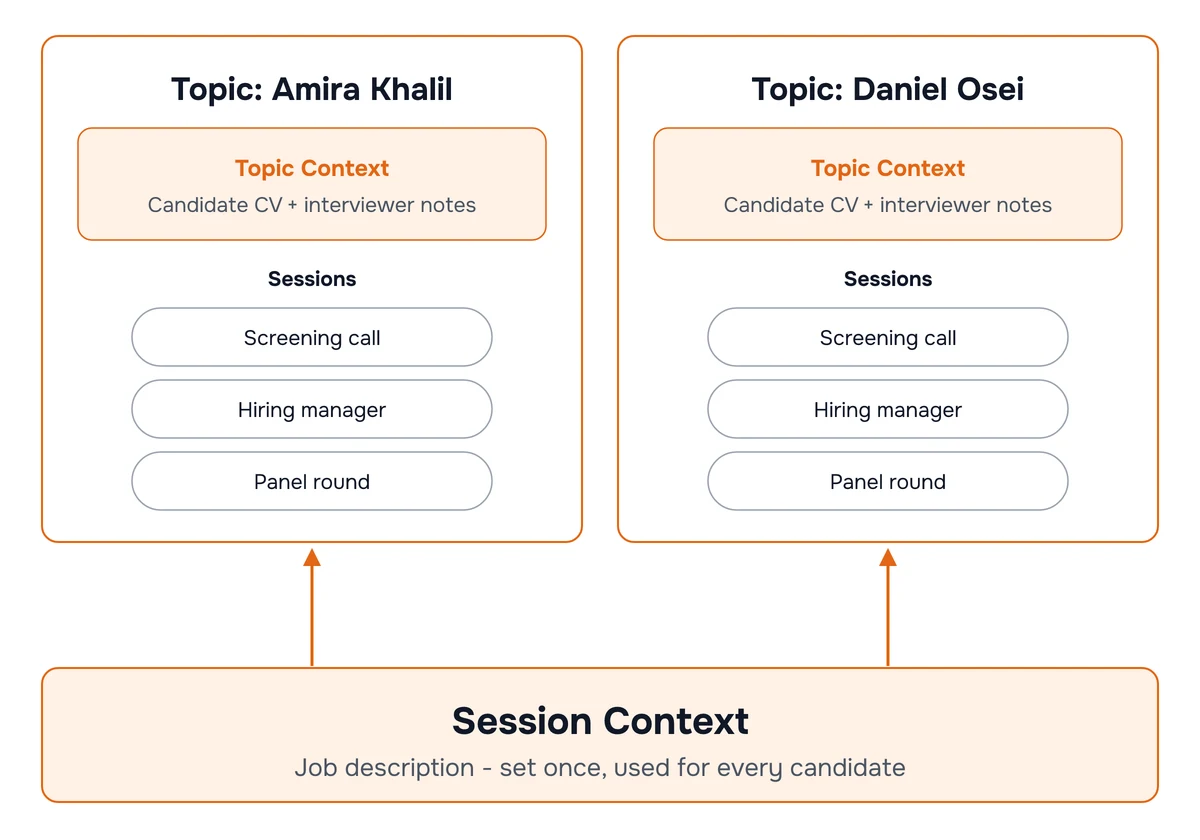
Notice what is missing: the candidate. Candidates change with every interview, so they live one level up, in the topic.
Step 3: Create a Topic for Each Candidate
Everything specific to one candidate goes into a topic. This is the most powerful part of the setup, because hiring is never one conversation:
-
Create a topic named after the candidate
-
Add every conversation about them to it: the screening call, the hiring manager round, the panel, the reference calls
-
Open the topic, go to its Settings tab, and paste the candidate’s CV into AI context & instructions. It saves on its own
That last part is Topic Context, and it applies automatically to every session inside the topic. The CV follows the candidate through every round without being re-entered, and the job description stays available from the session context underneath. When the next candidate comes in, you create a new topic and paste their CV; your role setup does not move.
Topic Context is also where round-specific goals belong, because they change as the candidate advances. Before each round, add a line about what this conversation needs to establish: a screening call that has to verify basics is a different conversation than a final round that has to close.
Because Hedy holds both the CV and the live conversation, it can compare them. When a candidate describes their last role differently than their CV does, you can catch it while you can still ask about it, not two days later in a debrief: ask in the chat, or tap the “Something feels off” quick action.
The topic also builds a cumulative profile of the candidate across the whole loop: qualifications against the role, concerns raised in earlier rounds, and the questions nobody has asked yet. Before the next round, open the topic and see exactly what still needs an answer.
Free accounts include one topic, which covers one active candidate. Pro accounts have unlimited topics, one per candidate in your pipeline.
Step 4: Start the Interview
Hit start and focus on the candidate. Hedy listens in the background and does not need anything from you during the conversation.
Automatic suggestions appear on their own as the conversation unfolds. Glance down when you have a moment. Hedy is deliberately selective: it shows one to three suggestions at a time, and only when they are worth interrupting your focus for. They show up at the moments that matter most to an interviewer:
-
Follow-up questions when an answer stayed at the surface and the experience underneath is worth probing
-
Clarification prompts when something the candidate said seems to conflict with their CV or an earlier round and is worth pinning down
-
Uncovered ground when the conversation is drifting and a must-have from your context has not come up yet
-
Selling moments when the candidate signals real interest and it is the right time to make the role attractive
-
Practical logistics when compensation, notice periods, or location questions come up, which are easy to fumble mid-conversation
You can also ask Hedy directly in the chat at any point. “Are there any inconsistencies I should look out for?” and “What has this candidate not been asked yet?” work exactly as you would hope, because Hedy has the CV, the job description, and every earlier round in front of it.
Quick Actions You Can Tap Anytime
When you want specific help in the moment, tap a quick action. The full list is in the Recruitment quick prompts reference. There are five categories:
First Impressions
-
Check the candidate’s fit against the role requirements
-
Understand why they are really looking to move
-
Pin down something that feels off before it slips by
Dig Deeper
-
Probe beyond a rehearsed answer into what they actually did
-
Test whether they are hands-on or describing someone else’s work
-
Question timelines and numbers that do not add up
Team & Culture
-
Explore how they lead, collaborate, and think about managing
-
Assess fit with how your team actually works
-
Pressure-test how they handle conflict and setbacks
Practical Matters
-
Open the compensation conversation cleanly
-
Nail down availability, notice periods, and location
-
Find out where else they are interviewing
Close Strong
-
Address their hesitations before the call ends
-
Sell the opportunity to a candidate you want
-
Set clear expectations for next steps
Step 5: Review the Results
After the interview, Hedy generates two outputs built for a hiring decision:
Session Summary (Recap)
-
Candidate profile covering skills, experience, and key qualifications against the role
-
Assessment notes with strengths, concerns, and cultural fit signals
-
Practical details such as salary expectations, availability, and location preferences
-
Next steps with follow-up actions and the decision timeline
Detailed Notes
A structured candidate profile built from the conversation, ready to reuse: a three-line professional summary, key information (current role, location, notice period, salary expectations, key skills), professional experience, education and certifications, technical and soft skills, recruiter notes covering strengths, considerations, and cultural fit, and next steps. It sticks to what was actually said and marks anything the interview did not cover as not provided instead of guessing.
Both feed the topic. The candidate’s overview refreshes after every round, so the profile always reflects the latest conversation.
What Hedy Will Never Do
-
Score candidates. Hedy surfaces evidence: what was said, what contradicts the CV, what has not been asked. It does not produce ratings, and you should be skeptical of any AI that claims it can score candidates objectively. The judgment stays with you.
-
Join your call as a bot. Hedy is an app on your own device. Nothing joins the meeting, and nothing appears on the candidate’s side unless you share a screen that has Hedy on it (how to keep Hedy out of a screen share).
-
Make the hiring decision. Hedy organizes what happened and can suggest next steps for your pipeline, but it is a well-organized memory of the interview, not a verdict. The final call is yours.
-
Share anything without you. Suggestions, notes, and assessments stay with you unless you choose to export or share them.
Recording audio is a separate, optional setting in Hedy, and interviews are exactly the kind of conversation where consent rules and company policy apply. If you turn it on, read recording laws and consent first, and check with your HR or legal team about what your process requires.
Tips for Best Results
-
Context is everything. The job description in your session context and the CV in the topic are the difference between questions built for this candidate and generic interview filler.
-
Update the topic between rounds. Add what earlier interviewers noted, concerns worth revisiting, and anything the candidate was asked to prepare. The next round’s suggestions account for all of it.
-
Brief the next interviewer from the topic. The unanswered questions in the candidate’s overview are a ready-made briefing for whoever runs the next round, so rounds stop repeating each other.
-
Stay present. The suggestions will be there when you glance down. Candidates read distraction quickly, and the interview is still a conversation, not a checklist.
Pro tip: Ask “What should the next interviewer focus on?” in the chat right after the call, while your own impressions are fresh. Paste the answer into the topic context and the next round starts exactly where this one left off.